As a freelancer, you’ve probably experienced this unpleasant situation at least once: You complete a project, deliver it on time, only to face delayed or even missed payments, so you need to know what to do when your freelance clients don’t pay you.
Immediate Steps to Take when Your Freelance Clients Don’t Pay You
First, understand that every freelancer walks this path at some point. When faced with such a situation, be sure to take immediate action. Review your initial contract, understand your rights, and remember, communication is key. Sending a polite yet firm reminder often solves the issue, as clients may simply have forgotten or overlooked the invoice.
The Importance of a Strong Contract
A comprehensive freelance contract forms your first line of defense against non-paying clients. It must clearly stipulate the payment terms, deadlines, late payment fees, and the services to be provided. This ensures that both parties are well aware of their obligations and rights, which can help to avoid disputes or misunderstandings.
Regular follow-ups are crucial. Send a professionally drafted email, emphasizing the overdue invoice, payment terms, and your intention to resolve the situation amicably. If the client remains unresponsive, consider escalating the matter with a formal demand letter or involving a third-party collection agency.
Collection agencies can provide significant assistance when it comes to unpaid invoices. They can take on the hassle of chasing payments, allowing you to focus on your work. However, this should be considered as a last resort due to the associated fees and potential damage to client relationships.
Small Claims Court: An Option to Consider
If the owed amount is substantial and all else fails, taking legal action might be the next logical step. In the United States, the Small Claims Court handles disputes involving small amounts and could be an efficient route to pursue payment.
Preventative Measures: Best Practices for Freelancers
Prevention is always better than cure. Implement these best practices to safeguard your freelance career from payment issues:
Upfront Payment: Always try to secure a portion of the payment before starting the project. This will not only confirm the client’s commitment but also minimize your risk.
Clear Communication: Make sure that your payment terms, project scope, and deadlines are communicated clearly to the client from the outset.
Progressive Billing: For larger projects, consider progressive billing where you charge portions of the fee at different milestones.
Build Relationships: Establishing strong, positive relationships with your clients can go a long way in ensuring prompt payment.
The Role of Freelance Platforms
Reputable freelance platforms provide a sense of security to freelancers by offering payment protection services. They often hold the project fees in escrow, releasing the funds to the freelancer once the job is completed to the client’s satisfaction. Therefore, using such platforms could help minimize the risk of non-payment. In conclusion, freelancing can sometimes be a wild ride with ups and downs. However, by taking the right precautions, maintaining professionalism, and being persistent, you can effectively navigate through the challenge of non-payment. Always remember, you’re not alone in this journey. There are plenty of resources available to support you in ensuring you’re rightfully paid for your hard work.
Don’t forget that many freelancers are waiting to do the little tasks for you, so if you’re really busy, take time to find someone to do your emailing, invoicing, and follow up emails.
If you like this post and it helped you, then please share it with your friends. I appreciate any comments and any clicks on my links to help me keep posts like these free. Comment below.
Whether you’re a professional writer, a student, or simply someone who loves to write, having the right tools can significantly improve your writing process. In this article, we’ll explore various writer’s tools that can help you write more efficiently and effectively. We’ll cover writing platforms, grammar and style checkers, organizational tools, writing prompts, and more.
Writing Platforms and Word Processors
Microsoft Word
Microsoft Word has been the go-to word processor for many writers for decades. It offers a wide range of formatting options, templates, and collaboration features. Additionally, it’s compatible with most devices, making it an ideal choice for writers on the go.
Google Docs
Google Docs is a free, cloud-based word processor that allows you to create, edit, and store documents online. It’s perfect for collaboration, as multiple users can work on a document simultaneously. Plus, it automatically saves your work, so you never have to worry about losing your progress.
Scrivener
Scrivener is a powerful writing software specifically designed for long-form writing projects, like novels, screenplays, and research papers. It offers extensive outlining, organizing, and research tools that help you keep track of your ideas and structure your work efficiently.
Writer’s Tools: Grammar and Style Checkers
ProWritingAid
ProWritingAid is another grammar and style checker that also focuses on enhancing your writing style. It offers suggestions for improving readability, eliminating redundancy, and fixing inconsistencies. Additionally, it provides detailed reports to help you understand your writing strengths and weaknesses.
Distraction-Free Writing Environments
FocusWriter
FocusWriter is a minimalistic writing application designed to help you concentrate on your writing without distractions. It provides a simple, customizable, and full-screen interface that hides other applications and toolbars, allowing you to focus solely on your writing.
Calmly Writer
Calmly Writer is another distraction-free writing tool with a clean, minimalistic interface. It offers essential formatting options and automatically saves your work to the cloud, ensuring your writing is safe and accessible from any device.
Writer’s Tools: Organization
Trello
Trello is a project management tool that helps you organize and prioritize your writing tasks. You can create boards for different projects, add tasks in the form of cards, and move them through customizable columns as you progress. It’s great for tracking the development of your writing projects and collaborating with others.
Evernote
Evernote is a note-taking app that allows you to capture and organize your thoughts, ideas, and research in one place. You can create notes with text, images, audio, and more, then easily search and categorize them for quick access.
Need a book cover for your new novel? Then Creative Market has a host of artists ready to help you design your new cover.
Writing Prompts and Idea Generation
Writing Prompt Websites
There are numerous websites that offer writing prompts and ideas to help you overcome writer’s block or generate fresh content. Some popular ones include:
r/WritingPrompts on Reddit
Writer’s Digest Writing Prompts
Reedsy Writing Prompts
Writing Communities
Joining a writing community, either online or in-person, can provide valuable feedback, support, and inspiration. Some popular online writing communities include:
Scribophile
Critique Circle
Absolute Write Water Cooler
Writing Templates and Outlining
Pre-made Templates
Templates can help you get started on your writing projects by providing pre-formatted structures for various types of content, such as blog posts, essays, or business documents. You can find templates in most word processors, or search online for specialized templates that cater to your specific needs.
Outlining Tools
Outlining tools help you plan and structure your writing by breaking it down into smaller sections or chapters. Some popular outlining tools include:
Workflowy
Trello
OmniOutliner
Writer’s Tools: Research Tools and Fact-Checking
Google Scholar
Google Scholar is a search engine for academic literature that can help you find scholarly articles, books, and other research materials related to your topic. It’s an invaluable resource for writers who need to conduct in-depth research for their work.
Evernote Web Clipper
The Evernote Web Clipper is a browser extension that allows you to quickly save and organize web content, such as articles, images, or PDFs, directly into your Evernote account. This can be helpful for keeping track of your research materials and sources while writing.
Collaborative Writing
Google Docs
As mentioned earlier, Google Docs is an excellent tool for collaborative writing, as it allows multiple users to work on a document simultaneously. Its real-time editing and commenting features make it easy to share ideas and provide feedback.
Draft
Draft is another online writing platform designed for collaboration. It offers version control, so you can easily compare different drafts of your work and accept or reject changes. It also provides collaboration features such as comments and suggestions.
Writer’s Tools: Editing and Proofreading Services
Professional Editors
Hiring a professional editor can significantly improve the quality of your writing by providing expert feedback and guidance. Many freelance editors and editing services are available online, catering to various genres and writing styles. Keep in mind that the cost of these services may vary depending on the length and complexity of your work.
Peer Review Platforms
Peer review platforms, such as Scribophile and Critique Circle, allow you to share your writing with other writers and receive feedback. This can be a cost-effective way to improve your writing and gain new perspectives on your work.
Writer’s Tools: Conclusion
Having the right tools at your disposal can make a significant difference in your writing process. By exploring and utilizing the writer’s tools mentioned in this article, you can streamline your workflow, improve your writing skills, and create high-quality content. Remember, the most important aspect of writing is practice and persistence, so keep honing your skills and exploring new tools to take your writing to the next level.
1. Can free writing tools provide the same level of quality as paid tools?
Yes, many free writing tools offer excellent features that can help you improve your writing. However, some paid tools may offer more advanced features or better support. It’s essential to find the tools that best fit your needs and budget.
2. How can I improve my writing skills?
The most effective way to improve your writing skills is to practice regularly, seek feedback from others, and learn from various resources, such as books, articles, or writing courses.
3. What are some good resources for learning more about writing techniques and styles?
Books, blogs, podcasts, and writing courses are all excellent resources for learning about writing techniques and styles. Some popular books on writing include “On Writing” by Stephen King and “Bird by Bird” by Anne Lamott.
4. Can I use multiple writer’s tools simultaneously?
Absolutely! Many writers use a combination of tools to create an efficient and effective writing process tailored to their specific needs.
5. How important is it to use a grammar and style checker?
Using a grammar and style checker can help you catch errors and improve the overall quality of your writing. However, it’s crucial to remember that these tools are not infallible and should be used as a supplement to your own editing and proofreading efforts.
If you liked this post, please add a comment to it. I love comments! I’d appreciate it if you shared my post with the world, so hit those share buttons!
Finding focus amidst the noise can be a real challenge in our increasingly digital and connected world and using brown noise as a writing tool can help. Yet, for writers, achieving and maintaining concentration is undeniably crucial. One unexpected tool shown to help is Brown noise, a specific type of sound masking that can encourage focus and boost productivity.
What is Brown Noise?
Brown noise, also known as Brownian or red noise, is a soothing, low-frequency sound similar to the soft roar of a waterfall or the gentle patter of rain on a rooftop. Unlike white noise, which contains all frequencies equally and can sound like static, Brown noise decreases in intensity at higher frequencies, providing a warmer and softer auditory backdrop.
In terms of aiding the writing process, Brown noise can be particularly beneficial due to its consistency and ability to mask other more distracting sounds. Whether you’re writing from a bustling coffee shop, a busy office, or just dealing with typical household noises, Brown noise can provide a stable and consistent audio environment that allows you to tune out the extraneous sounds and tune into your thoughts.
What does Brown Noise Sound Like?
Using Brown Noise as a Writing Tool
It is relatively easy to integrate Brown noise into your writing routine. Numerous online platforms and apps offer free access to high-quality Brown noise tracks. You can play these on your computer or through headphones if you prefer not to disturb others. The volume should be adjusted to a comfortable level in the background – not so loud as to become a distraction, but strong enough to help muffle external noises.
Another advantage of using Brown noise as a writing tool is its potential to reduce the symptoms of tinnitus, a condition that causes a persistent ringing or buzzing in the ears and can be particularly distracting for writers. By masking the irritating tinnitus sounds, Brown noise can provide significant relief, allowing you to fully concentrate on your writing.
However, like any tool, Brown noise isn’t a one-size-fits-all solution. Some people may find it distracting or simply not beneficial. The key is to experiment and find out what works best for you. You may want to try other forms of sound masking, such as white noise or pink noise, to discover which color of noise best fosters your personal productivity.
It’s also important to remember that using Brown noise should be part of a broader strategy for creating a focused and productive writing environment. This can include setting specific writing goals, ensuring your physical comfort, and taking regular breaks to avoid burnout.
Brown noise can be a surprisingly effective tool for writers seeking a cocoon of focus amidst distractions. While it might not replace a disciplined writing routine or a well-structured work environment, it can certainly enhance them, providing a consistent, calming backdrop against which your creativity can flourish. It’s always worth experimenting with different strategies to find what helps you write your best – and Brown noise might just be the unexpected key to unlocking your next level of productivity.
If you like this post, please share it with your friends! Writing is hard, and any tools that we can use to make it easier is appreciated. Got comments? I love comments. Please drop me a line.
If you’re like me, you get really busy doing day-to-day tasks and don’t always take the time to hone your skills. I found on of the best ways to keep in practice was to participate in a 30-day blogging challenge. It’s easy to do and you don’t need anyone to join you. It’s you and the keyboard.
Here is a quick start guide to get you started:
Editorial Calendar
I find that as long as I have something written in my desk calendar, then I am more likely to do it. Because I am a task-oriented person, everything has to be written down for me. Mostly, so I can mark them off and get a feeling of satisfaction!
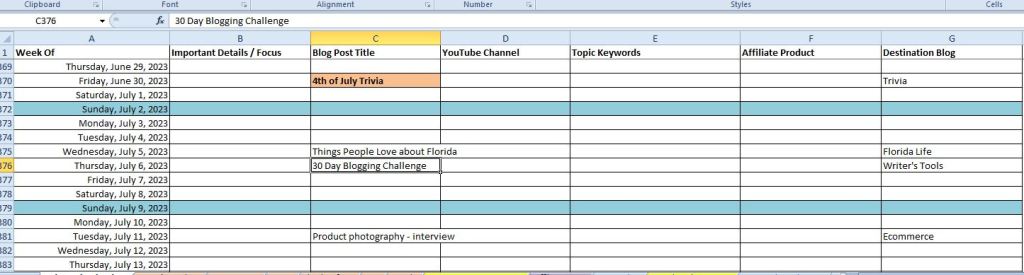
This is an example of my editorial calendar:
I have four blogs in the works, so it’s necessary for me to use a spreadsheet to keep my writing on track. I plan my posts out four months in advance, add them to my calendar, and my day timer software. This way, I can work in advance and I don’t have to spend any time trying to figure out what I’m going to write about. You can set up the spreadsheet in google docs too.
Need some help getting started on your blogging challenge?
I’ve talked about my favorite software for writers before, but I want to focus on the tools I use to help me organize my writing. One of the things that I am still amazed by even after over 20 years is the fact that I can write as many documents as my computer has the memory to hold. To me, that’s an amazing thing. The software I use is equally, seemingly endless.
NOTE: All of the software I mention, I own and use regularly. I am not affiliated with any of these products.
As I have written about Scrivener in the past, you might know that I use it for everything I write – eventually. Anytime I am working on a nonfiction piece, I use Scrivener to keep my chapters in order and everything nice and neat.
I know that I don’t use it to its fullest application. There is a Facebook group for Scrivener users, and they are always asking questions about the software that is so far out of my ability to understand that I usually ignore those conversations. I’ve found that the software is as easy or as complicated as you would like it to be.
Scrivener keeps my notes in order and gives you easy access to chapters.
Scrivener can be used as a series of notepads, which is what I use it for, or you can use the templates to build a story. It has a bit of a learning curve, and since I use other software, I’ve not gone that far with the tutorials.
Software for writers can compile text to document format
Once you’re done writing, you can compile the entire manuscript into several formats. The part I like the best is the tree on the side where I can see my chapters and get to them easily. I can’t do this in word or google docs.
I am trying to write fiction. I spent hours and many dollars reading books on how to write a novel, how to outline a novel, how write from the seat of my pants, and hours of trying to understand acts and beats.
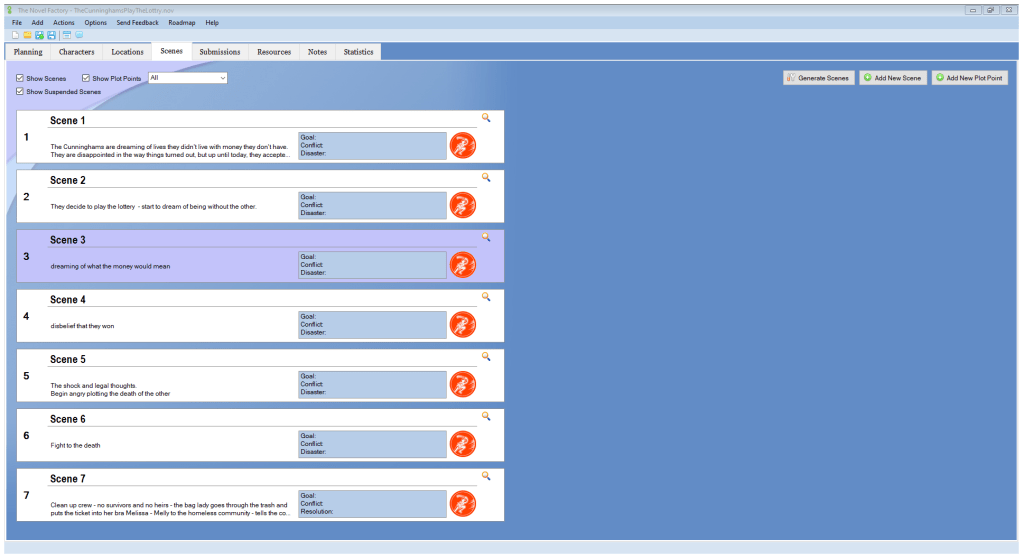
It wasn’t until I gave The Novel Factory a trial run did all the things I had read fall into place. I wrote the first part of my very first novel in word until I couldn’t see my way through the fog. That’s when I started looking for something to help me stay on track. The Novel Factory software does that.
This is the background of The Novel Factory where you can see the scene outlines at a glance.
This overlay gives you the scene details. You write into the text box. I love the scene blocking tab.
I bought the software as a standalone on my desktop, and I moved my first novel into it, and was able to finish it. It’s a mess that needs to be rewritten since it’s way off track, but I will get to that.
Keeps the story on track
The book second in the series started in The Novel Factory and it went very smoothly without any of the problems I ran into the first time. With the outlines and templates to work with or modify to meet your needs, it’s much easier to stay on course and wrap up the story. Both of those novels are 60K plus.
You can build your own outline/beat sheet or use pre-designed templates that are free to download. In fact, I had downloaded the free templates before I bought the software. I liked them so much that I decided to buy the software.
If you’re struggling with your plot, you might want to look into The Novel Factory. No, it does not give you cookie cutter stories.
Plottr is a plotting software that I had to modify to get it to work the way that I wanted to use it. In its simplest form, it is a glorified excel workbook. That being said, it’s much more than that.
The outline below is a list of my current and future projects and different series using a template by another author who needed an organizational chart.
This outline shows my current and TBD projects at a glance.
Here is what it looks like when you plot a book:
Chapter outline on left in default mode.
My complaint in this format is that it’s hard for me to follow the chapters. I think I might be the only one though since everyone loves this software. I used it halfway through my first novel, and it kind of helped me get things and people organize, but it still was hard for me to follow. This is why I moved to The Novel Factory.
Choose your view
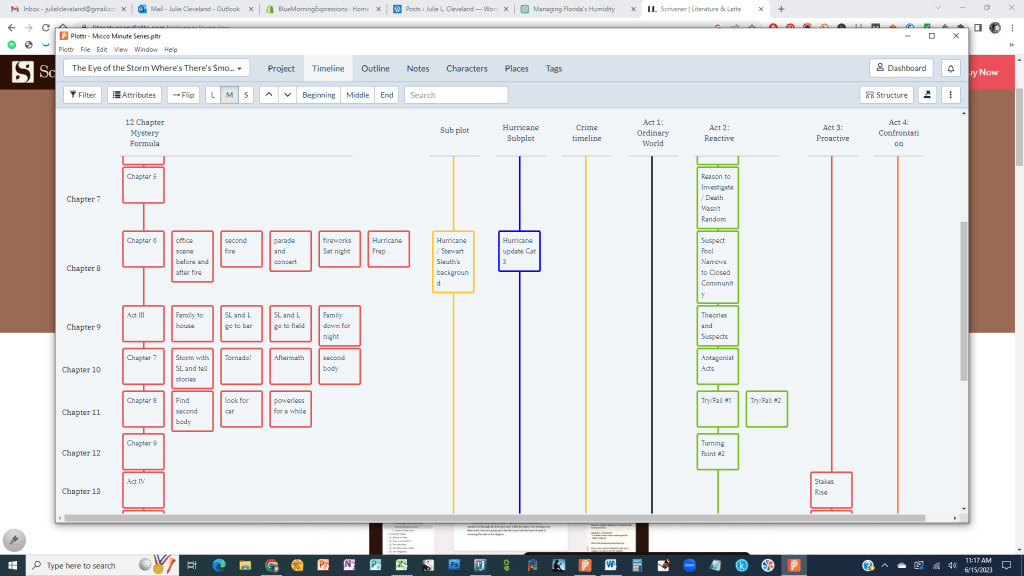
I used it to lay out my second book, and once I flipped the view, I found it much easier for me to follow. Here is the flipped version for the second book:
By flipping the view, I found it easier to see the chapters and my characters timeline.
Now I can see where in the story these things happen.
Another view of the character’s timeline.
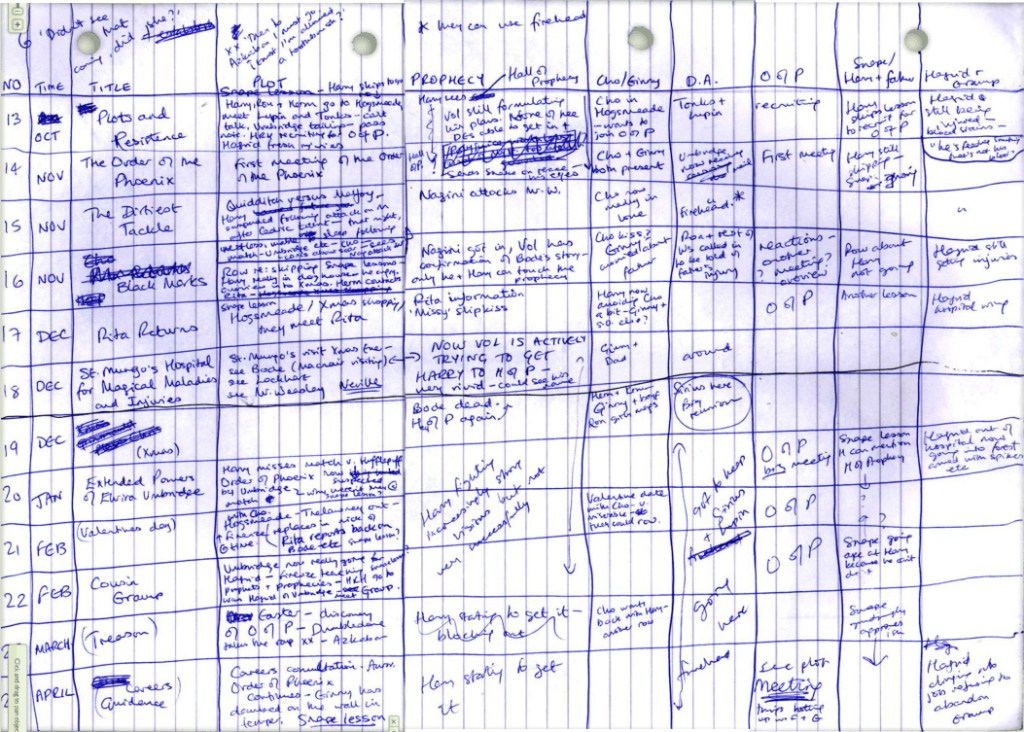
I have J.K. Rowling to thank for this because someone posted her spreadsheet worksheet and it was laid out in the same format, but she had the chapters off to the left.
You can use a regular piece of notebook paper to write on.
There’s nothing expensive or sophisticated about her method. In fact, it’s not even a lined accounting spreadsheet. Just a piece of notebook paper.
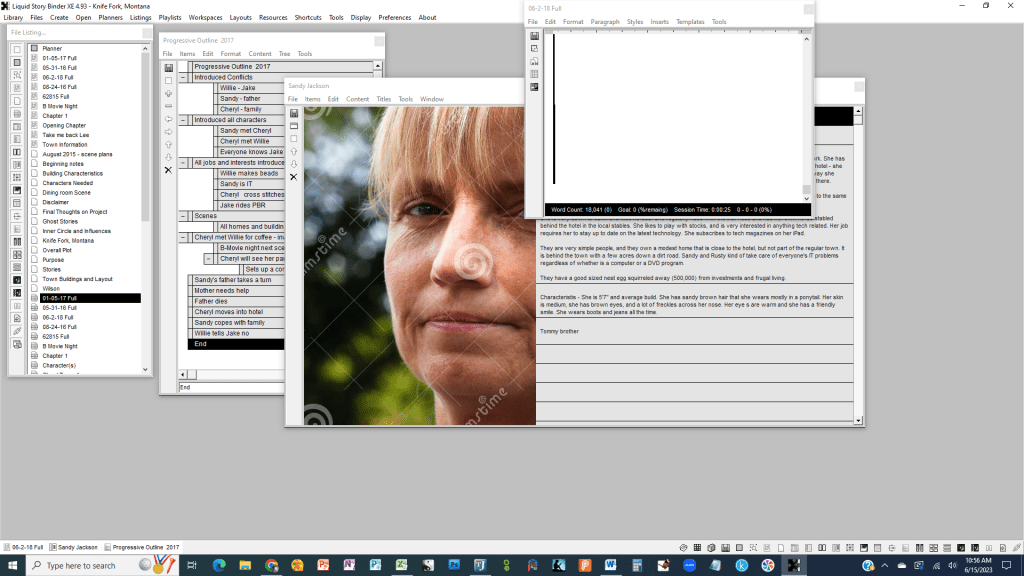
This is the first software I bought about 12 years ago. I used it to start my first novel, and at the time, I couldn’t afford Scrivener or anything else expensive, so I bought this software. I love the heck out of it. It’s easy to use, and it helped me to keep my story semi-organized.
Build character with photos
I think the part I really liked was that I could build my character pages and add photos. I could lay out my scene maps and make notes. It was everything I wanted that kept everything orderly and ready to use.
I confess that the story is still in its original condition, and I have not gone back to write on it for almost 8 years, but it is still a story I will go back to. What I didn’t know when I started writing was how plotting was important, so this is a seat of your pants story from beginning to end.
I am only a quarter of the way into the story, and I don’t’ know how it will end, but I have a good idea that it will continue to be a seat of the pants type story.
Liquid Binder XE is an economical way to plot, organize, and write your novel. It’s a Scrivener alternative.
The story has gone from word to Liquid Binder to Scrivener back to word, and one of these days, it might go to print. It’s a story I really want to write, and I daydream about it when I am supposed to be doing something else.
Plot or seat of your pants software for writers
Even though her mom was absent from her post, she could see her father sitting in his old, worn high-back leather chair. The ancient leather was worn thin in places and cracked in others. The sun had faded out half of the chair from buttery, gold leather to a pale, pink color. Her father had molded the cushions to suit his body from years of use to the point the no one else found it comfortable. That was one way to keep the guests out of it.
Although the hearth was cold and the fireplace clean, she saw her father sitting with his feet up on the hassock before it as if the temperatures were subzero and the Montana winds were bearing down on the old hotel.
Sandy noticed that he appeared to be talking to himself. On second glance, it seemed more likely that he was having a conversation with someone only he could see.
Her deep sigh reflected the sadness she felt about the loss of her father to his disease.
These are my favorite software for writers that have kept me sane and moving forward. Hopefully, you will find them helpful for productivity.
Like this post? Share it with your friends and comment below! I love comments.
When you use the best research tools for writers, your articles will stand out from all of the rest of the internet. I’m primarily a nonfiction writer, which means that I rely on tools to look up information.
I used to go to the library with my notepad, gather all my reference books, sit down at a desk, and find the answers to any questions I might have about the subject matter. While it’s not much different now by using online tools, being online allows me to go deeper than I could in the library. It’s time consuming to do deep research by hand, and by using online tools, I can quickly decide if I’m on the right path.
Best Research Tools for Writers
Google Scholar: An online search engine that allows users to look for scholarly literature. This includes articles, theses, books, and conference papers. While I don’t use this regularly, it does have a wealth of information that I can use to write my automotive articles like finding a book that gives me an overview of automotive sensors that I can quote.
JSTOR: A digital library for scholars, researchers, and students, providing access to thousands of academic journals, books, and primary sources from various disciplines. Once again, I can use this site to find information the differences between the Japanese and US Automotive sectors when it comes to inventory reduction and productivity growth, which I can use to write about our ongoing recovery from the pandemic.
Academia.edu and ResearchGate: Social networking sites where researchers can share papers, ask and answer questions, and find collaborators. Academia.edu allows you to download millions of PDF files on subjects like medieval history, ancient history, economics and more. ResearchGate connects you to the scientific community. These sites are out of my realm of expertise, but I do like history, so I am looking forward to getting lost in the Academia.edu rabbit hole.
PubMed: A free research database from the National Institutes of Health (NIH). It’s useful for researching medical and health-related topics. While this is so far out of my area, it looks like it is a great place to find out information on clinical trials and citations.
ProQuest: A multidisciplinary research tool that offers access to a collection of databases with information on a variety of subjects. I found information on financial reports for AutoNation, fabrication of metal automotive parts, and press releases from automotive aftermarket services that are useful for my work with subscription based automotive services.
Organizing Your Research
Evernote: A note-taking app that can save your web research, allows you to make notes and clipping, and is searchable. I use the free version of this tool, and I have found it helpful when grabbing webpages as I was doing my preliminary research, so I could go back later and refine or discard the results. It’s less clicking than copying and pasting to my notepad or in the body of my word doc.
OneNote/Notion: These are note-taking tools that allow you to organize your research in a structured manner.
I love OneNote; it’s colorful, organized, structured, is fun to write in, and I have been using it for over 20 years. OneNote came in the Microsoft Office 2003, and I was hooked. I like that I can reference it across platforms from my tablet to the desktop to my phone and can jot notes or look things up no matter where I am. Pricing may vary on it, and you may be able to use it for free through Microsoft apps on your phone or tablet.
Notion is the same thing as OneNote, but it appears to be free. In a comparison that I read, the difference between the two pieces of software is not that big. However, Notion is less robust, but if you’re looking for a note taking piece of software, I recommend either one for their organizational tools if nothing else.
A screen shot of one of my OneNote notebooks
Citing Your Sources
Zotero: A free, open-source reference management software to manage bibliographic data and related research materials. This is a downloadable app for your desktop or Chrome app.
Screenshot of the structure of Zotero
EndNote: A commercial reference management software package, used to manage bibliographies and references when writing essays and articles. This is a citation management piece of software that helps you organize your references. It has a free version, but you may want to buy the software.
Mendeley: A free reference manager and academic social network. Make your own fully searchable library in seconds, cite as you write, and read and annotate your PDFs on any device.
Writing Your Article
Hemingway Editor: This online tool helps simplify your writing. It grades your text on readability, identifies passive voice, and shows where you’re using adverbs or complex language that could be simplified. I use this off and on. I find it easy to use, but a bit of a pain. It’s rather clunky, but it’s accurate, so that’s a good thing. I offers suggestions on how to clean up your writing, and for my jobs, it helps me stay within an appropriate reading level.
Scrivener: This writing software is like a digital binder, enabling you to organize and rearrange your content easily. It has useful features for writers doing large amounts of research for their projects. I have used Scrivener since Stephen King told me to. Good enough for me. It’s a great organizational tool, and it has a lot of features that I will never use, so I use the ones I want. It keeps my books in order, and while I don’t always write in this, I do move them in there before I compile my manuscripts. This is an excerpt from a book I am working on that covers all of the scenic travel routes in the United States, so you can see why I need to stay organized.
Excerpt of one of my books in progress in my Scrivener software
Remember, different writers and researchers have different needs, so it’s important to find the tools that work for you!
In the rapidly evolving digital landscape, artificial intelligence (AI) has emerged as a powerful tool that can revolutionize various aspects of our lives, including content creation. Blogs play a crucial role in disseminating information, sharing insights, and engaging audiences, so should you be using AI in blog posts? There’s been a lot of talk lately on AI in the content world, but for years many writers have utilized Jasper to write copy for industries like Real Estate and Marketing. It’s only been since ChatGPT garnered all the attention that people have begun to wonder if AI has its place in our toolbox.
I have attended AI workshops, copywriting seminars on the use of AI, and listened to my peers discuss AI. AI is useful in helping me generate topic lists, outlines, random ideas, and research. I found that AI can dig deep into the internet while searching faster than I can wade through a cluttered Google search. That saves me time and money.
I’ve also positioned myself as an editor of AI content. My job is to edit, confirm, rewrite, and otherwise clean up blog posts for clients that use AI. While this does not make me that much money, it has opened the door up for me to do full content and copywriting while moving them away from AI.
Is AI good or bad? Here are some quick pros and cons for you to consider:
AI-powered content generation tools can automate the process of writing, saving valuable time and effort for bloggers. These tools can generate well-structured, grammatically correct, and SEO-friendly content, reducing the need for extensive manual writing and editing.
Increased Productivity
With AI assistance, bloggers can produce a higher volume of content without sacrificing quality. AI algorithms can analyze large datasets, identify patterns, and generate valuable insights, supporting bloggers in creating informative and data-driven articles.
Improved Writing Assistance
AI tools can serve as reliable writing assistants, helping bloggers improve their content. These tools can offer suggestions for sentence structure, vocabulary, and tone, enhancing the overall readability and coherence of blog posts.
Content Personalization
AI algorithms can analyze user data, preferences, and behavior to provide personalized content recommendations. This capability allows bloggers to tailor their blog posts to specific audiences, increasing relevance and engagement.
Are we at the point where we’re reading novels written by AI? I hope not!
Cons of Using AI in Blog Post
Lack of Human Touch
While AI can generate coherent and informative content, it may lack the human touch and creativity that resonates with readers. Authenticity and emotional connection, which are often key aspects of successful blog posts, may be compromised when relying solely on AI-generated content. This is the one area that most people like me who write for a living realize will never be replaced by AI. In copywriting, you must strike the emotional response from the reader, and AI cannot do that.
Limited Contextual Understanding
AI algorithms may struggle to grasp the nuances of specific industries, cultures, or contexts. This limitation can result in inaccurate or inappropriate content generation, potentially damaging a blogger’s credibility and reputation. Human expertise and manual editing are necessary to ensure that AI-generated content aligns with the intended purpose and context.
Ethical Concerns
The use of AI in blog posts raises ethical considerations regarding the transparency and disclosure of AI-generated content. Readers have the right to know whether the content they are consuming is created by AI or a human author. Lack of disclosure may lead to misinformation and erode trust between bloggers and their audiences. Proper labeling and transparency practices are essential to maintain credibility and ethical standards.
The argument here is that most of us use search engines to find answers to the questions we’re asking, so to what extent is AI different? At what point is it different for me to use that information to write a paragraph as opposed to AI writing that paragraph. AI is a better speller and typist, but the end result is the same –with less grammatical errors. For the most part, unless I’m quoting an article or citing a source, my information could have come from the back of the cereal box for all anyone knows.
Potential for Algorithmic Bias
AI algorithms are only as unbiased as the data they are trained on. If the training data contains biases, it can be reflected in the generated content, perpetuating stereotypes or discriminatory views. Bloggers must be cautious and actively monitor AI-generated content for any biases that may inadvertently seep into their blog posts. This is a bit harder to pinpoint, but worth noting.
Conclusion
There are a lot of benefits to using AI to assist you in your writing, and there is nothing wrong with using it as a research tool. I have discovered that the use of Grammarly to edit my work has caused more AI red flags to pop up than using AI to write. The key is the tone. The more personable the writing is the less likely AI detectors will go off. My automotive content is usually a bit stiffer, and that sets the flags to waving.
Not to go all Brazil on everyone, but at what point do we circle back on ourselves and start rewriting what we rewrote years ago?
If you haven’t seen Brazil, then check it out here or at your local library. It will give the term getting lost in paperwork a whole new meaning. This movie features Johnathan Pryce (Game of Thrones), Robert DeNiro, and Katherine Helmond (Soap). It was written by Terry Gilliam (Twelve Monkeys, The Fisher King.) I digress …
AI is a useful assistant that usually gets my coffee right.
Like this post? Please share it with the world. Also, if have a comment about using AI in blog posts, then please post your comments. I would love to discuss this more.
Writing from your home office can become boring and uninspiring at times. Since writing is a pleasurable experience – up to the editing part -, where you write can be much like the journeys your characters discover. That’s why if my brain no longer is participating in the writing process, I look for a new place to write. I have compiled a list of some great places to write if you need inspiration or just a getaway day.
Libraries are Great Places to Write
Libraries have always been a favored sanctuary for writers, offering an environment conducive to writing, access to an extensive range of resources, and a community of like-minded individuals. Many libraries also provide free Wi-Fi and computer access, which facilitates research and writing while on the go.
As a kid, I lived at the library as much as possible, so it’s only natural that this is the first place I seek refuge. There’s inspiration everywhere, and if you still can’t kick start your creativity, then take a break and read a book.
Coffee Shops are Great Places to Write
Coffee shops are a popular choice for writers seeking a change of scenery. They provide a warm, inviting ambiance, access to caffeine, and free Wi-Fi. For those in search of motivation, endeavor to locate a coffee shop with a distinct aesthetic or vibe that speaks to your soul. This is not my first choice because I find them too distracting, but it’s possible that I’ve never found the right coffee shop.
Museums
Museums offer an excellent alternative for writers who thrive on inspiration. They present a plethora of information and artifacts that can stimulate your imagination and assist in establishing your writing zone. Many museums also offer designated areas for writing, making them an ideal choice for those who require a serene space to work.
As a nonfiction writer, I tend to gravitate towards research. I can get lost down a rabbit hole for days, and the museum is just the right place to find facts and inspiration. I can’t say that I’ve ever written at a museum, but only because I don’t have but one near me, and I’ve written about it instead.
Parks are Great Places to Write
Parks provide a remarkable opportunity to engage with nature, which has always been a source of inspiration for writers. Whether you are seeking a serene spot to read or write, or you would like to take a break and admire the scenery, parks offer an excellent option.
Whenever possible, I like to take a notepad and write at a park picnic table. I’ve been doing this since I was about 11 or 12, and it’s still my favorite place to write. I find being outdoors freeing, and if I run out of words, I can people watch or in my case, watch the pelicans float on the river.
Beaches
If you are fortunate enough to live close to a beach, it is a remarkable resource to seize! The sound of waves, the fragrance of salty air, and the sensation of sand between your toes can all contribute to a relaxed and creative writing atmosphere. I have tried to write on the beach, but that’s a no-go for me. Between the sand on the paper (yes, still pen and notebook when remote), suntan oil, and flopping around trying to get comfortable, I can’t do it. I can do it from the parking lot watching the ocean, and thousands and thousands of words have been written there in my car.
Co-working Spaces
Co-working spaces are a splendid option for writers in need of a dedicated workspace without having to commit to a long-term lease. They offer an array of amenities, including free Wi-Fi, printing services, and access to meeting rooms. This is another place I can’t write. It’s like the coffee shop all over again, only with office machines and noisy co-workers.
I went full-time freelance to stop working with other people in my space, so I don’t seek this out. However, I know that many of my previous co-workers couldn’t work from home because they got bored and lonely, so this is perfect for them.
Bookstores
Bookstores are an additional exceptional choice for writers. They offer an extensive selection of books and resources to inspire your writing, as well as a quiet space to work. Some bookstores also host author events and writing workshops, providing additional opportunities for inspiration and growth.
I’ve always felt guilty about using the bookstores like a library, so I don’t sit and read at a bookstore. I seem to be overly cautious about not wanting to camp out in a bookstore, even when there are tables and comfy couches just for that purpose.
Community Centers are Great Places to Write
Community centers offer an ideal choice for writers who wish to connect with their local community. They provide a range of activities and events, including writing groups and classes, offering an opportunity to meet other writers and gain valuable feedback on your work. If my community center had a local writer’s meet-up, I would consider going. I don’t know that I would be able to work at a community center, but I know that it might be a good place to do some casual research on current topics for magazine articles.
Universities
Universities offer a treasure trove of resources for writers, including libraries, writing centers, and workshops. They frequently host readings and other events featuring prominent writers, providing an opportunity to connect with the writing community and gain inspiration from established authors. Like the museums, I don’t have a close university to hang out in, but I am sure that I could find a spot to curl up and write.
Art Galleries
Art galleries can be a phenomenal source of inspiration for writers. They offer an array of visual art that can spark your creativity and inspire new ideas. Many galleries also provide designated writing spaces, making it effortless to locate a quiet spot to work.
I have not written anything art related, so I have not tried to write in an art gallery, but like the museum and university, I can see where it would be a good place to conduct research while educating myself on art.
Need some inspiration for writing during the holidays? Check out my simple list of ideas.
Historic Sites
Historic sites offer a glimpse into the past and can be a rich source of inspiration for writers. They frequently have designated writing spaces, making them an excellent choice for those who require a tranquil location to work. Like writing in the park, this offers a good place to pull up a picnic table and get your pen out.
I love to explore historic sites and spend a lot of time reading plaques and taking walks when I get to one. I have a passion for visiting all of the Civil War battlefields, and while I haven’t written about the war, I have spent time at a park bench quietly contemplating the actions of so many.
Nature Reserves are Great Places to Write
Nature reserves are a prime selection for writers who yearn to connect with nature and relish a peaceful environment. They present an array of hiking trails and opportunities to view wildlife, providing an excellent escape from the hustle and bustle of daily life. Having trekked over the mountains, hiking in Florida is not the same.
In fact, it’s hard to sit in a Florida nature reserve and write because we have lots of big mosquitoes. If there’s a mosquito, it will find me and bite me. On the other hand when I hiked in the Bridger Mountains around Bozeman, MT, I found many a place to sit down and jot my thoughts onto paper. It’s all in the environment.
Writer’s Retreats
Retreat centers provide a tranquil environment to work, away from the distractions of daily life. Many retreat centers offer writing residencies or workshops, providing an opportunity to connect with other writers and receive valuable feedback on your work. Like other organized activities, I am not very good at them.
I tend to wander off and seek an even quieter place to be, or my creativity gets so boxed up that a retreat only makes it worse. I do know many writers who thrive under retreat conditions and enjoy the opportunity to share their work and critique others.
Everyone has a story to tell.
Botanical Gardens and Zoos
Botanical gardens present a peaceful environment and an extensive array of plants and flowers that can inspire. Zoos are said to have been the inspiration for Dr. Seuss, so if you like to write at the garden or zoo, you’re in good company. Personally, if the botanical garden is outside, then I can find a place to sit at a bench and enjoy the flowers and trees, but if it’s in a greenhouse, I can’t sit still and enjoy it.
I find that zoos and gardens bring out the photographer in me more than the writer, but I know from experience that whenever I have photos of some place I’ve been, I will sit down and write about the experience.
Final Thoughts
No matter where you decide to write, if you find the inspiration to keep your story moving forward, then it’s the perfect spot for you.
Writing is solidary, so these ideas might help you get away from your desk and into the public.
If you found any of my tips useful, please feel free to comment below. I love comments! Sharing my post will help me keep this blog open. So, thank you for that.
With the ever-expanding digital landscape, copywriters have numerous opportunities to specialize in various niches, ranging from white papers to advertising and beyond.
1. White Papers Copywriting Niche
White papers are authoritative, in-depth reports that educate readers about a specific issue, solution, or technology. They are typically used by businesses to generate leads, establish thought leadership, and support decision-making processes.
You must be skilled at conducting research, synthesizing complex information, and crafting persuasive narratives.
2. Digital Marketing Copywriting Niche
Digital marketing copywriters create content for various online marketing channels, including email campaigns, social media posts, and paid advertisements.
If you’re going into this niche, make sure that you stay current with the social media platforms and how audiences interact with them. The interaction is the key to effective conversions for your client.
3. SEO Copywriting Niche
SEO (Search Engine Optimization) copywriting is the process of crafting content that is optimized for search engines, helping clients rank higher in search results and attract organic traffic. You must be adept at keyword research, on-page optimization, and creating high-quality, shareable content that aligns with both user intent and search engine algorithms.
Since this niche changes every time there is a search engine update, it is imperative that you stay current on the best practices for SEO writing by taking a course, reading the updates, and joining a group of SEO writers.
4. Ghostwriting Niche
Ghostwriters create content on behalf of clients, without receiving public recognition for their work. This can include writing books, articles, blog posts, or social media updates.
The ghostwriting niche seems to be a long-term relationship since often it involves long-term book, ebook, or other publication projects.
You must be versatile and able to capture the unique voice and style of each client while maintaining confidentiality.
5. Article Writing Niche
Article writing is keeping people engaged with your words. It doesn’t matter if the article is online or in a magazine, you have to inform and entertain your reader. You must be able to research, tell a story, and stick to editorial guidelines and deadlines.
6. Content Writing Niche
Content writing is a lot like article writing, but it also includes case studies, website copy, and blog posts to name a few. If you’re able to create informative and structured content that meets your client’s needs and targets their audiences, this might be the niche for you.
7. Advertising Copywriting Niche
Advertising copywriters create persuasive and compelling content for print, radio, television, and digital advertisements. It helps to be skilled at understanding consumer psychology, crafting catchy headlines and slogans, and conveying a brand’s message in a concise and impactful manner.
You’ll find many online courses, like AWAI, that will teach you this type of writing. It is my favorite form of writing; although most of my writing is in the article and content department.
8. UX Writing Niche
UX (User Experience) writing focuses on creating clear, concise, and user-friendly content for digital products and applications. It is your job to collaborate with the client’s creative team to devise a seamless user experience.
Your primary focus is on microcopy such as button labels, error messages, and navigation instructions. UX writing is very close to technical writing, but from a user’s perspective.
9. E-commerce Copywriting Niche
Another one of my favorite niches E-commerce copywriting. E-commerce writers specialize in crafting product descriptions, website copy, and promotional materials for online retailers.
You must be skilled at understanding consumer behavior, highlighting product features and benefits, and persuading potential customers to make a purchase.
As on online retailer since the 1980s, this type of writing has changed, so not only do you combine the art of advertising copywriting with content writing, you have to be up on SEO writing. Remember, online product descriptions are driven by placement in the search engines.
10. Real Estate Copywriting Niche
Real estate copywriters create engaging and informative content for property listings, brochures, websites, and marketing materials.
You must be adept at describing property features, conveying the unique selling points of a property, and generating interest among potential buyers or tenants.
If you love looking at homes and beautiful property, this niche might be the best for your talents. This niche might be easy to get into by talking to local real estate agents about their listings online, especially on social media.
11. Brand Copywriting Niche
Brand copywriters help businesses establish and maintain a consistent brand voice and identity across all marketing channels. You will create content that reflects a brand’s values, personality, and target audience, ensuring a cohesive message throughout all marketing materials.
12. Sales Copywriting Niche
If your client asks for sales copywriting, they want you to write content that drives their prospects to ask for more information or to buy something. You could be asked to write a landing page that asks prospects to sign up for a newsletter or schedule a consultation.
You must understand consumer psychology, craft compelling calls-to-action, and develop persuasive arguments that address potential objections and demonstrate the value of a product or service.
Again, there are online courses that can help you craft sales letters.
13. SaaS Copywriting Niche
SaaS (Software as a Service) copywriting focuses on creating content for software companies, including website copy, blog posts, case studies, and promotional materials.
You must understand the technical side of the software you’re writing about to give users clear instructions on how to use it.
Some SaaS products you might use and not realize it as SaaS are Adobe subscriptions, Microsoft Office Suite subscriptions, and other products that require a monthly payment to use.
Conclusion
As the digital world continues to grow and evolve, the demand for specialized copywriters across various niches will only increase. When you focus on a specific niche, or a combination of a few like SEO and content writing, you can polish your skills and better understand who your client’s needs.
Being focused will help you set yourself apart from the competition. No matter which of the niches you like, you should figure out which one combines your interests, strengths, and market demands.
Here are some tips that might help you find your copywriting niche:
1. Assess your interests and strengths: Begin by evaluating your personal interests and areas of expertise. Consider how they align with potential niches in the copywriting industry.
2. Research the market: Identify gaps in the market where your skills and interests can be valuable. Examine competitors in these niches to gauge the level of competition and potential for success.
3. Validate your niche: Test your chosen niche by conducting keyword research to understand the demand for your services. As noted in the real estate section, look at the local listings and find a home listing that could use a rewrite. You can reach out to the real estate agent and ask them if could give them a sample of your work by rewriting their listing.
4. Develop your brand: Create a unique selling proposition (USP) that sets you apart from competitors and highlights your expertise within your niche. Build a professional website and online presence that showcases your USP, portfolio, and client testimonials.
5. Network and market yourself: Attend industry events, engage with potential clients on social media, and create valuable content to demonstrate your expertise and build your reputation within your niche.
I hope that finding a copywriting niche is helpful to you in your copywriting career. Even if it is just a small start, then it’s a step in the right direction toward independence and a freelancing career.
If you enjoyed this post, please share it far and wide! I love comments, so please tell me what you liked or didn’t like about this post. I am always open to suggestion.
Want to read more posts? Check out some of my other posts about writer’s tools.
It doesn’t matter if you write content for your local dentist or do affiliate marketing as I do for these posts, SEO is a must-learn skill. The crazy part about SEO is that it is always changing, so there is no sitting back and thinking that you got it all handled. That’s when it will change again on you.
So, here are five SEO tricks that hopefully will help you stay on top of your game when it comes to content and copywriting:
Conduct Thorough Keyword Research:
The foundation of any successful SEO strategy is relevant and targeted keywords. Start by identifying the most important keywords in your niche using tools like Google Keyword Planner, Ahrefs, or SEMrush. Analyze the search volume, competition, and keyword difficulty to find the perfect balance for your content. Incorporate these keywords naturally into your blog posts, titles, and Meta descriptions to improve your content’s search engine ranking.
It also helps to go back to old posts and check them for relevancy. I know this is a tedious thing – I am in the process now of going back a year and doing brush-ups and updating links and such. It’s a pain, but I hope to rank better in my blog posts this way. One of my regular clients has me do this every couple of years, so this is ongoing work.
Write Engaging and Valuable Content:
Quality content is the backbone of effective SEO. Focus on creating informative, engaging, and original content that answers your target audience’s questions and addresses their pain points. Search engines favor well-written, valuable content that provides a satisfying user experience. Additionally, useful content is more likely to be shared, increasing the chances of acquiring backlinks, which also helps boost your SEO.
There was a time when I was hired to write posts that were stuffed with keywords – this was back around 2010 – and even though I knew it was wrong, I needed the money. I am so glad that has gone by the wayside thanks to search engines driving those results to the basement where they belong.
Optimize Meta Tags and Headers:
Meta tags, including title tags and Meta descriptions, are essential for on-page SEO. They provide search engines with a summary of your content, helping them understand its relevance to a user’s search query. Ensure that your Meta tags contain your target keywords and are engaging enough to entice users to click through to your content. Similarly, use header tags (H1, H2, H3, etc.) to break up your content and make it more accessible, while including relevant keywords.
Don’t forget to make sure that your ALT text image descriptions also include your keywords (or slugs as some marketers call them) because they are also crawled by the search engines.
Use Internal and External Links Wisely:
Strategic use of internal and external links can significantly enhance your content’s SEO. Internal linking connects your content to other relevant pages on your website, helping search engines understand the site’s structure and improving your site’s overall authority. External linking to authoritative and relevant sources adds credibility to your content and helps build trust with both users and search engines.
This is another thing that I am working to update, and it will continue to be something that I will always be doing since my category posts can always be referred back to another post somewhere.
Optimize Content for Mobile and Page Speed:
With the increasing use of mobile devices for online browsing, it’s essential to optimize your content for mobile users. Make sure your website is responsive, and the content is easily accessible on different devices. Additionally, page speed plays a significant role in user experience and search engine rankings. Use tools like Google PageSpeed Insights to identify areas for improvement and ensure your content loads quickly.
This is something that you can implement for your site, but if you’re like me and selling your work to clients, they are the ones that need to make sure that the speed is up to user standards. You can help them with that by showing them results and giving them suggestions.
Incorporating these five SEO tricks into your freelance writing will help you create content that ranks higher on search engine results pages and attracts more readers. Just remember that SEO is always changing, so stay updated by signing up for newsletters by gurus in the industry.
































 Julie L. Cleveland